
A Practical Field Guide to Email Marketing Automation
Why Email Marketing Automation Matters
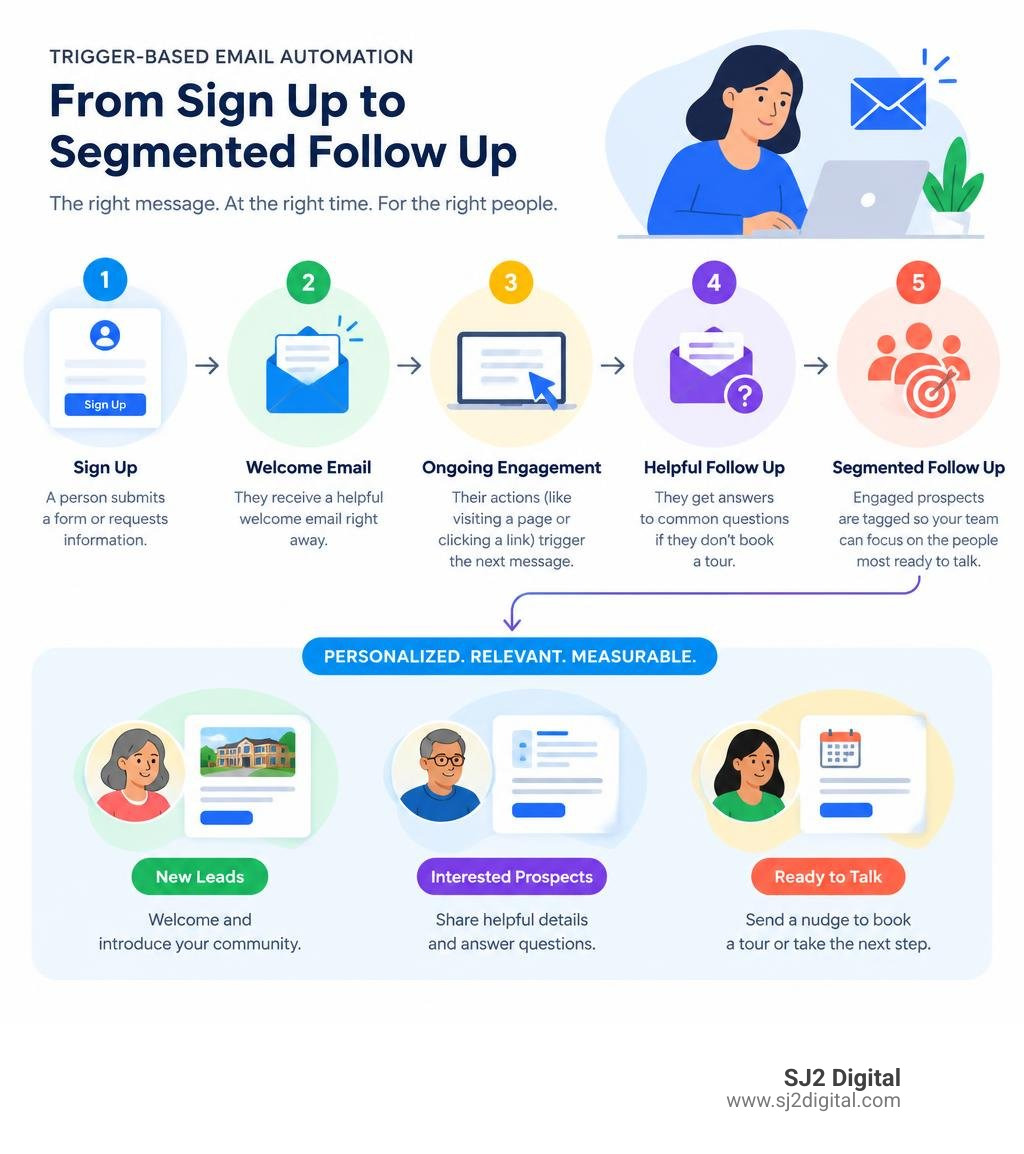
Email marketing automation uses software to send useful emails when a person takes a specific action or reaches a certain point in their journey. Instead of manually sending every follow-up, you build a workflow once, then let triggers such as a form submission, website visit, inquiry, purchase, or period of inactivity start the right sequence.
For a senior-living operator, that could mean:
- A family receives a helpful welcome email after requesting information.
- A follow-up answers common questions if they do not book a tour.
- Engaged prospects are tagged so your team can focus on the people most ready to talk.
The goal is not to send more email. It is to make each message more timely, relevant, and measurable.
That matters because manual newsletters treat every subscriber much the same. Automated workflows can respond to real behavior and guide prospects from first interest to a conversation, tour, or next step. Welcome emails are especially strong early in the relationship: research cited in this guide reports average open rates of 63.91% and click-through rates of 14.34%.
This field guide explains how automation works, which workflows are worth building first, and how to measure whether your emails are creating qualified leads rather than just activity.
What Is Email Marketing Automation and How Does It Work?
At its simplest, email marketing automation replaces guesswork and manual batch sends with targeted logic. Instead of blasting your entire database every Tuesday morning with generic news, an automated system operates continuously in the background. It acts like a digital assistant that never sleeps—and never asks for a coffee break.
The process relies on tracking event data and synchronizing customer interactions between your website, customer relationship management (CRM) software, and email platform. When an individual takes an action (such as downloading a floor plan, browsing a specific product tier, or clicking a pricing link), the platform logs that event and routes the contact through a predetermined sequence of tailored steps.
Core Components: Triggers, Conditions, and Actions
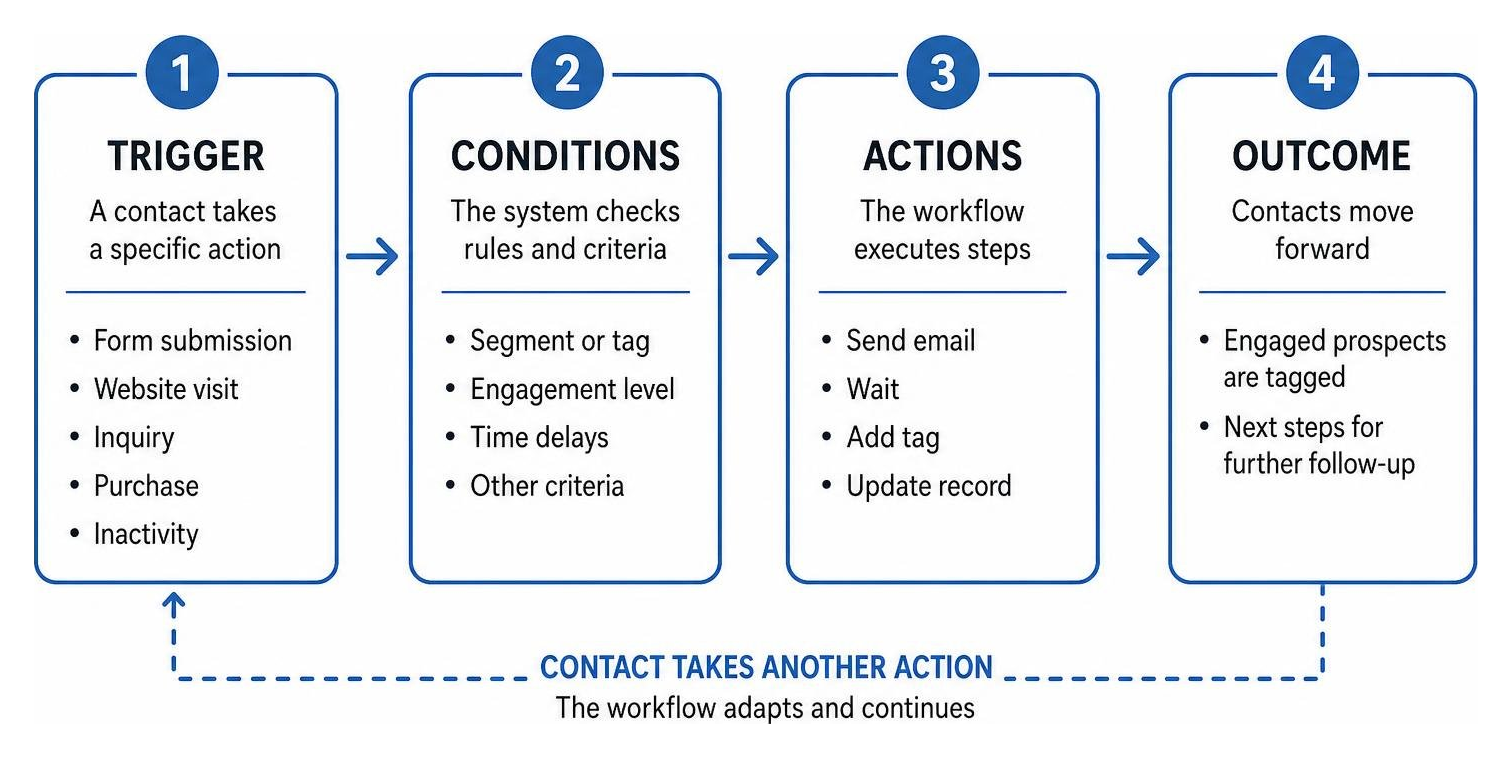
Every automated workflow consists of three foundational building blocks that dictate how and when messages arrive in an inbox:
- Triggers: The specific event or criteria that launches a sequence. Examples include submitting a web form, joining a list, hitting a date-based anniversary, abandoning a checkout session, or having a contact record updated via an API or webhook.
- Conditions (Filters & Delays): The decision rules that determine which branch a contact follows. Conditions check subscriber attributes, such as whether a contact has booked a tour, their geographic location, or whether they opened the previous email. Delays (e.g., "Wait 3 days") control the pacing of communications to prevent inbox fatigue.
- Actions: The execution step carried out by the platform. This involves sending a specific email, sending an SMS, assigning a tag, updating a lead score, creating a task for your internal sales team, or syncing data with third-party software.
The Progression from Simple to Professional Email Marketing Automation
Automation maturity typically evolves through three stages as businesses refine their data models:
- Simple Automation (Linear Drip Sequences): A time-delayed series of static emails. Everyone who joins gets Email 1 on Day 1, Email 2 on Day 3, and Email 3 on Day 7, regardless of interaction. While better than manual sending, it lacks situational awareness.
- Advanced Automation (Multi-Branch Behavioral Flows): Workflows that branch based on recipient behavior. If a subscriber clicks a specific link, they move down Path A; if they ignore the message, they move down Path B or receive a gentle reminder.
- Professional Automation (Contextual Lifecycle Engines): Fully unified ecosystems that integrate CRM records, website browsing habits, and purchase history. Leading marketing automation platforms demonstrate how dynamic customer data, predictive send-time algorithms, and custom object attributes allow messages to adapt in real time to the individual's needs.
Key Benefits: Why Automated Workflows Outperform Manual Broadcasts
While standard newsletters remain a staple for 83% of B2B marketing strategies, relying solely on manual broadcasts leaves significant value on the table. Automation shifts your strategy from broad, one-way announcements to responsive, two-way conversations.
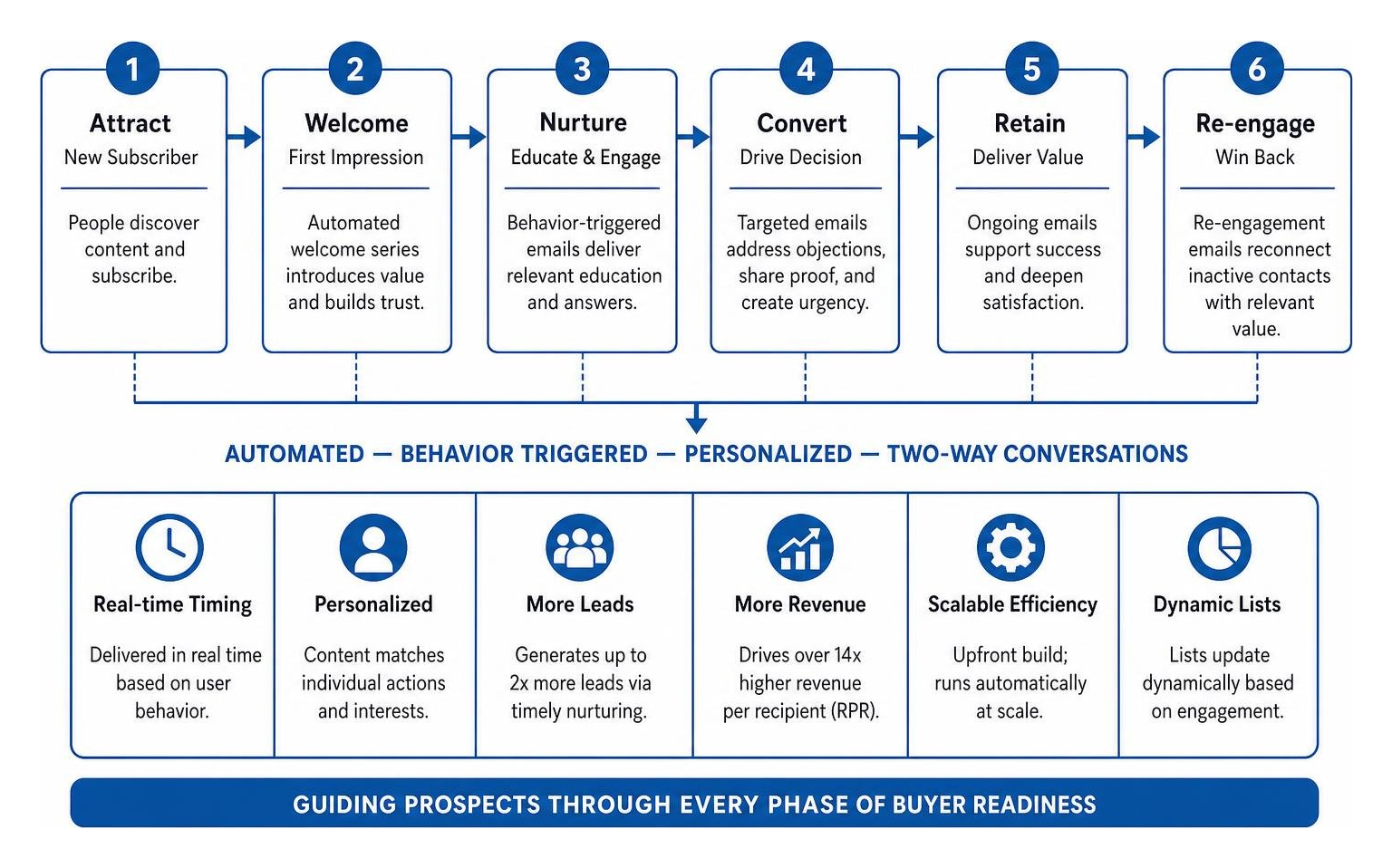
| Metric / Dimension | Manual Broadcast Campaigns | Automated Lifecycle Workflows |
|---|---|---|
| Send Timing | Fixed schedule based on sender preference | Real-time delivery triggered by user behavior |
| Content Relevance | Broad, generalized messaging | Personalized to individual actions and interests |
| Lead Generation Impact | Inconsistent; dependent on broadcast cadence | Generates up to 2x more leads via timely nurturing |
| Revenue Impact | Standard baseline | Drives over 14x higher revenue per recipient (RPR) |
| Operational Labor | High ongoing effort required for every send | Upfront build; runs automatically at scale |
| List Segmentation | Often static or manual | Dynamically updated based on real-time engagement |
Revenue and Lead Generation Gains
Automated emails consistently outperform standard campaigns because they arrive when a buyer’s intent is highest. Research demonstrates that businesses leveraging marketing automation generate twice as many qualified leads compared to those relying on manual campaigns.
Furthermore, automated emails drive over 14x higher revenue per recipient (RPR) than manual broadcasts. Because these workflows nurture prospects through every phase of buyer readiness—addressing specific hesitations, answering operational questions, and providing social proof—they turn cold interest into measurable revenue.
Time Efficiency and Workflow Scalability
Manual campaigns demand hours of drafting, list filtering, formatting, and scheduling for a single send. When you automate your core sequences, that recurring manual workload drops substantially.
A well-architected automation engine operates continuously, qualifying leads, welcoming new subscribers, and re-engaging lapsed contacts while your team focuses on high-value conversations, operational delivery, and creative strategy.
High-Impact Automated Email Workflows for the Customer Journey
To achieve sustainable growth, organizations need targeted sequences aligned with every phase of the customer journey. For specialized sectors like residential care, our dedicated senior living marketing services illustrate how thoughtful, empathetic email pacing helps guide families through complex, high-consideration decisions.
Welcome Sequences and First Impressions
The welcome sequence is your highest-leverage asset. With welcome emails generating an average open rate of 63.91% and click-through rates exceeding 14%, new subscribers are at their peak level of interest.
A structured welcome flow should:
- Deliver the promised resource (pricing sheet, guide, or discount code) immediately.
- Introduce your core value proposition and set clear expectations for future emails.
- Invite two-way engagement by asking new subscribers to reply with their primary challenge.
- Direct prospects toward initial next steps, such as exploring high-value educational content or scheduling an exploratory call.
Cart and Browse Abandonment Recovery
Across digital commerce and inquiry flows, average abandonment hovers around 70%. Approximately seven out of ten prospects who begin an inquiry or add items to a cart leave before completing the action.
Abandonment workflows systematically recover this pipeline value by sending timely reminders. Rather than relying on immediate discounts, effective recovery series start with customer service: asking if there was a technical glitch, addressing common FAQs, highlighting customer reviews, and providing a direct link to complete the step.
Post-Purchase Nurturing and Retention Campaigns
The relationship does not end at the initial transaction or signed agreement. Automated post-purchase flows reinforce the customer's decision, reduce buyer remorse, and build long-term retention.
These workflows should include transactional confirmations, detailed onboarding steps, best-practice guides, and scheduled check-ins requesting feedback or online reviews once the customer has had sufficient time to experience your service.
Essential Strategies for Workflow Optimization and Segmentation
An automated workflow is only as effective as the segmentation rules supporting it. Sending the wrong sequence to the wrong audience creates friction, causes unsubscribes, and harms your deliverability reputation. Incorporating specialized email automations helps businesses segment audiences dynamically and deliver tailored messaging that resonates.
Dynamic Segmentation, Tagging, and Lead Scoring
Rather than keeping contacts in broad, static lists, modern automation uses metadata to segment audiences automatically:
- Behavioral Tagging: Applying tags based on link clicks, resource downloads, or pages viewed (e.g.,
Interest: Memory CareorInterest: Independent Living). - Custom Attributes: Grouping subscribers by demographic details, geographic territories, or specific operational timelines.
- Lead Scoring Systems: Assigning point values to high-intent actions (e.g., +10 points for visiting a pricing page, +5 points for opening three consecutive emails). When a lead reaches a defined score threshold, the system automatically alerts your sales team for direct outreach.
Practical Steps to Launch Email Marketing Automation
Executing a reliable automation strategy involves five core steps:
- Map the Journey: Chart your workflow visually before touching your email software. Define the exact trigger, wait periods, decision forks, and ultimate conversion goals.
- Draft Value-Driven Copy: Focus on helpful, conversational content that addresses the recipient's immediate mindset rather than hard-selling at every turn.
- Configure System Triggers and Exits: Ensure workflows have clean exit conditions. For example, if a prospect schedules a tour, an exit trigger must immediately remove them from the general "Book a Tour" email flow.
- Implement A/B Testing: Test single variables systematically—such as subject line styles, delivery delays (e.g., 2 hours vs. 24 hours), or plain-text versus visual templates.
- Audit Data and Deliverability: Regularly review bounce rates, unsubscribe metrics, and spam complaints to maintain a pristine sender reputation across all major inbox providers.
Core Features to Evaluate in Automation Software
Selecting the right software depends on your operational structure, technical capabilities, and business model.

When evaluating platforms, prioritize these core operational features:
- Visual Workflow Builder: An intuitive drag-and-drop canvas that lets your team visualize complex, multi-branch sequences without writing custom code.
- Deep CRM & API Integrations: The ability to share bidirectional data with your CRM, payment processors, and scheduling tools.
- Dynamic Personalization: Support for dynamic content blocks that adapt copy, images, and offers based on subscriber attributes.
- Deliverability & Reputation Tools: Managed deliverability infrastructure, automated list-cleaning features, and dedicated IP options.
- Comprehensive Analytics: Transparent dashboards that report on revenue per recipient, funnel drop-off points, and long-term cohort retention rather than just vanity open metrics. For specialized industries like senior living, bespoke email automations provide the level of campaign transparency needed to make these evaluations with confidence.
Frequently Asked Questions About Automated Email Marketing
How do automated emails differ from regular newsletters?
Standard newsletters are broadcast manually to a broad list at a fixed time, containing generalized company updates or seasonal news. Automated emails are triggered individually by user actions, behavior, or milestones, delivering contextually relevant information precisely when the recipient is most engaged.
What metrics are most important for measuring workflow success?
While open and click-through rates help diagnose subject line and content engagement, the most critical metrics are conversion rate, pipeline velocity, and revenue per recipient (RPR). Monitoring workflow unsubscribe rates also reveals whether specific messages in your sequence are causing subscriber friction.
What is the ideal frequency for automated email sequences?
There is no single rule for cadence; it depends entirely on the context of the workflow. A time-sensitive inquiry or cart abandonment series might send 2–3 emails over 72 hours, whereas an educational lead-nurturing workflow may space messages 4–7 days apart to provide value without overwhelming the subscriber.
Conclusion
Automated workflows transform your email marketing from a manual chore into an intelligent, scalable growth channel. By aligning triggers with authentic customer behavior, your organization delivers the right guidance at the exact moment prospects need it most.
At SJ2 Digital, we operate on an agile "anti-agency" model with transparent live reporting, no rigid long-term contracts, and senior-level experts who roll up their sleeves to execute campaigns tailored to your business goals. Whether you are scaling an existing operation or launching new automated funnels, our team is ready to design bespoke email automations that drive real pipeline results. If you are ready to modernize your lifecycle marketing, contact us today to start the conversation.